Lots allow for lines to be put together and allow for the suppliers to put a price for the whole lot, as opposed to the individual lines. To create a lot, follow the instructions below:
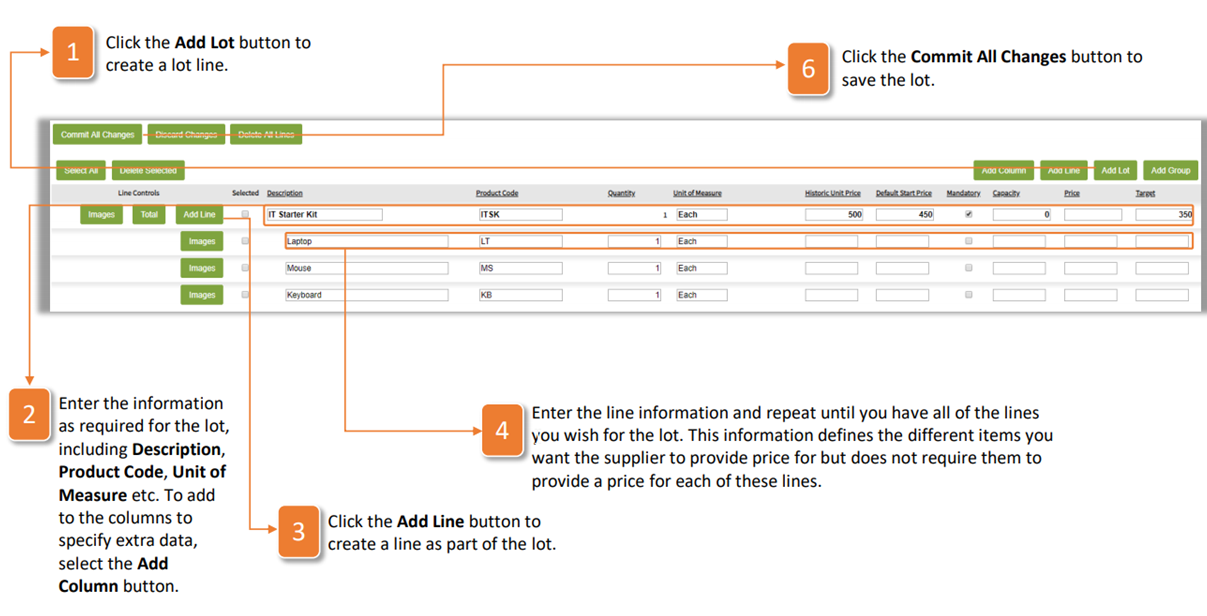
- Click the Add Lot button to create a lot line.
- Enter the information as required for the lot, including Description, Product Code, Unit of Measure etc. To add to the columns to specify extra data, select the Add Column button.
- Click the Add Line button to create a line as part of the lot.
- Enter the line information and repeat until you have all of the lines you wish for the lot. This information defines the different items you want the supplier to provide price for but does not require them to provide a price for each of these lines.
Was this article helpful?
That’s Great!
Thank you for your feedback
Sorry! We couldn't be helpful
Thank you for your feedback
Feedback sent
We appreciate your effort and will try to fix the article