Export
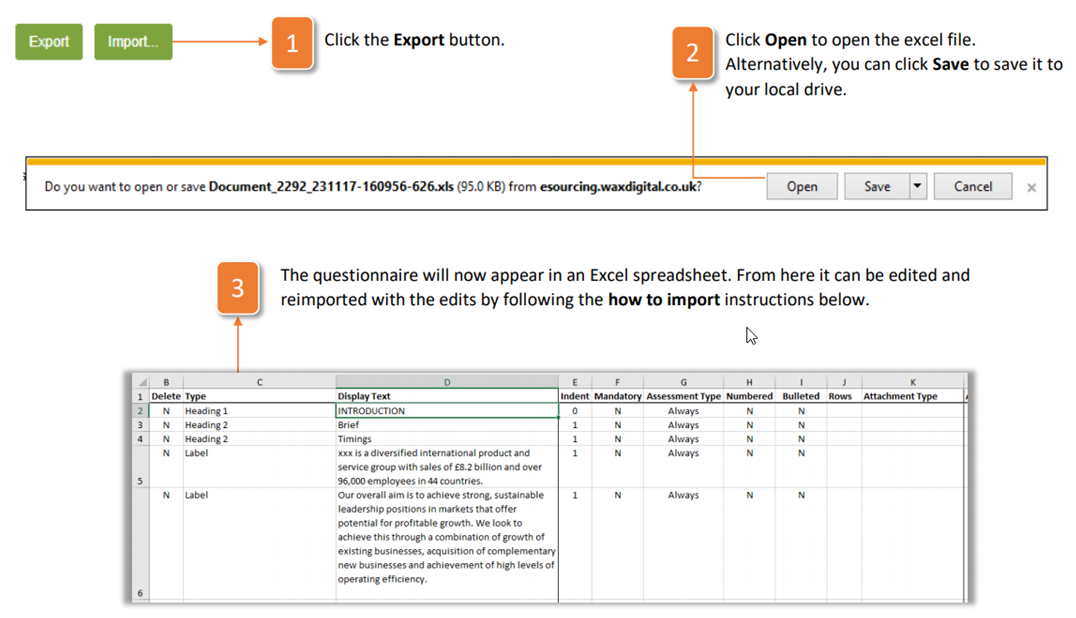
If you wish to edit or view the questionnaire offline in excel, then you will need to export the questionnaire. Follow the instructions below to do so:
- Click the Export button
- Click Open to open the excel file. Alternatively, you can click Save to save it to your local drive.
- The questionnaire will now appear in an Excel spreadsheet. From here it can be edited and reimported with the edits by following the how to import instructions below.
How to Import a Questionnaire
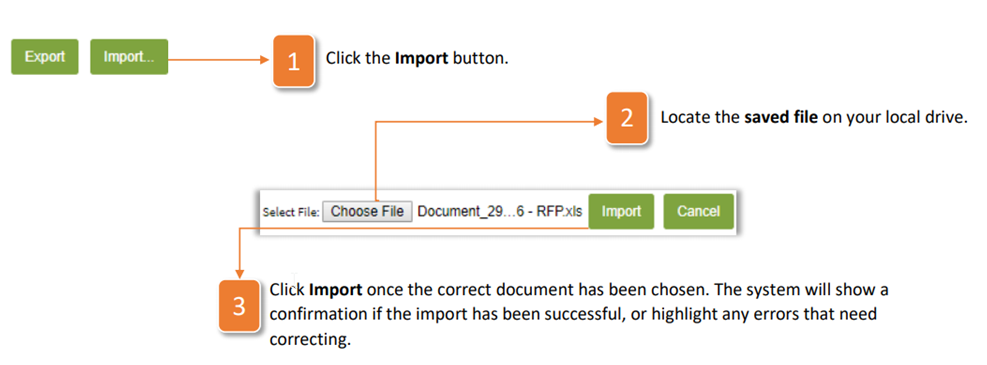
- Click the Import button.
- Locate the saved file on your local drive.
- Click Import once the correct document has been chosen. The system will show a confirmation if the import has been successful, or highlight any errors that need correcting.
Was this article helpful?
That’s Great!
Thank you for your feedback
Sorry! We couldn't be helpful
Thank you for your feedback
Feedback sent
We appreciate your effort and will try to fix the article