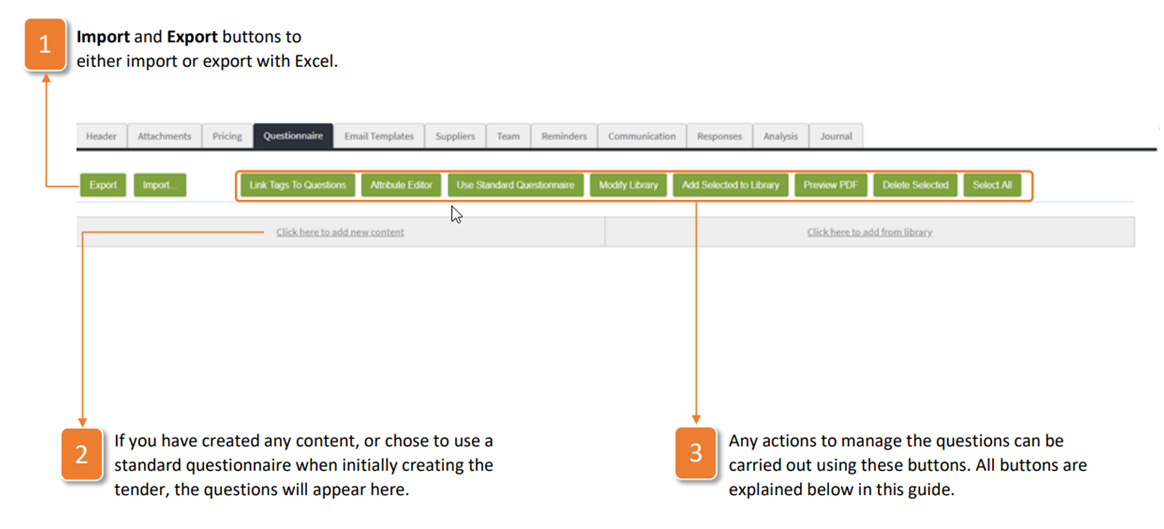
The Questionnaire tab is where you build the document that you want your suppliers to respond to. It is a flexible tool that allows you to gather all of the data that you would require when tendering for varying complexities of items. Questionnaires can be built within the application, or offline and imported in. The initial view of the Questionnaire tab will be the following:
- Import and Export buttons to either import or export with Excel.
- If you have created any content, or chose to use a standard questionnaire when initially creating the tender, the questions will appear here.
- Any actions to manage the questions can be carried out using these buttons. All buttons are explained below in this guide.
Was this article helpful?
That’s Great!
Thank you for your feedback
Sorry! We couldn't be helpful
Thank you for your feedback
Feedback sent
We appreciate your effort and will try to fix the article