In some questionnaires, you may wish suppliers to upload an attachment. This could be an insurance document, or any other separate document that you require as part of the questionnaire response. When adding an attachment upload question, follow the steps below:
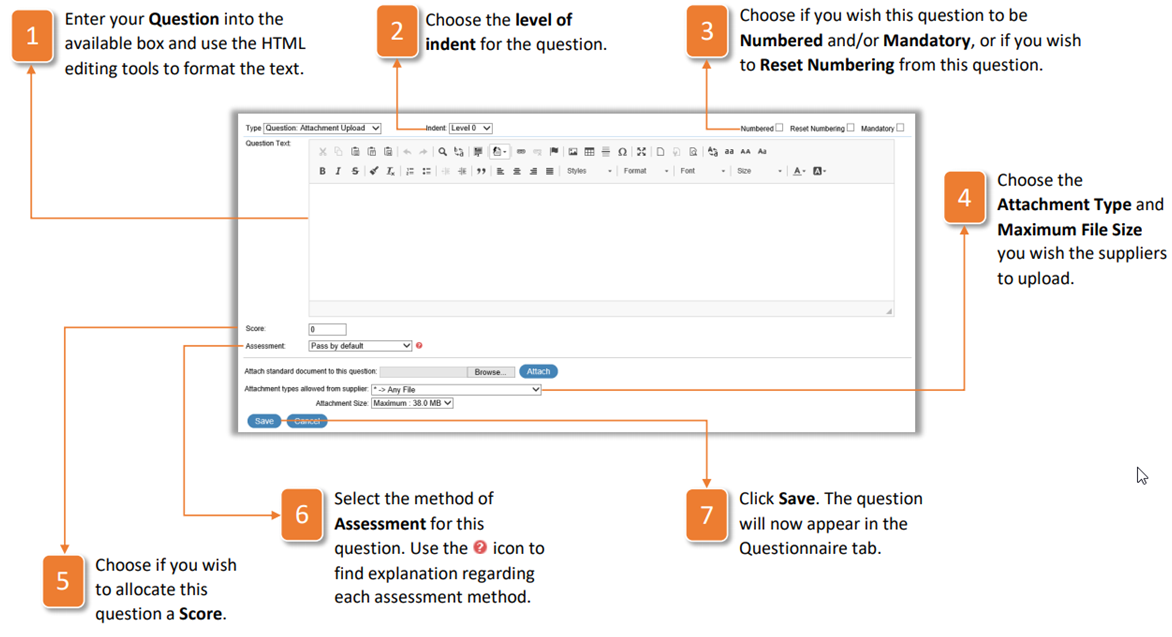
- Enter your Question into the available box and use the HTML editing tools to format the text.
- Choose the level of indent for the question.
- Choose if you wish this question to be Numbered and/or Mandatory, or if you wish to Reset Numbering from this question.
- Choose the Attachment Type and Maximum File Size you wish the suppliers to upload.
- Choose if you wish to allocate this question a Score
- Select the method of Assessment for this question. Use the icon to find explanation regarding each assessment method.
- Click Save. The question will now appear in the Questionnaire tab.
Was this article helpful?
That’s Great!
Thank you for your feedback
Sorry! We couldn't be helpful
Thank you for your feedback
Feedback sent
We appreciate your effort and will try to fix the article