A Radio Button Question is similar to a checkbox question in that it is multiple choice, however with a radio button question the supplier can only give one response. To create a radio button question, follow the instructions below:
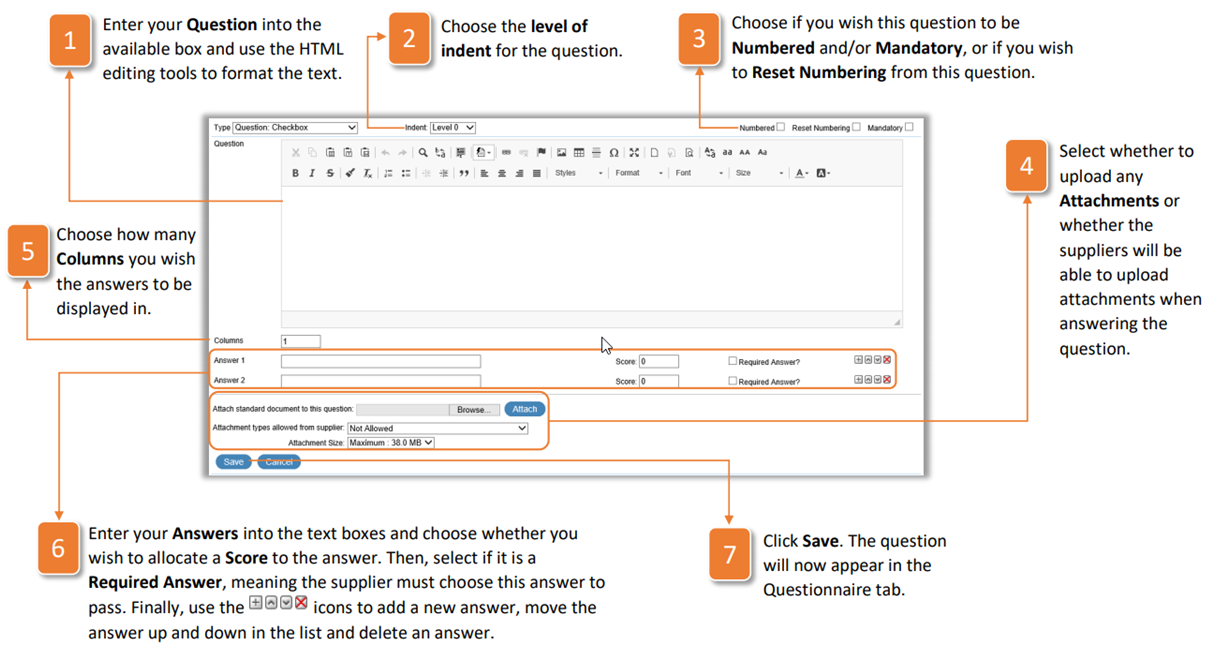
- Enter your Question into the available box and use the HTML editing tools to format the text.
- Choose the level of indent for the question.
- Choose if you wish this question to be Numbered and/or Mandatory, or if you wish to Reset Numbering from this question.
- Select whether to upload any Attachments or whether the suppliers will be able to upload attachments when answering the question.
- Choose how many Columns you wish the answers to be displayed in.
- Enter your Answers into the text boxes and choose whether you wish to allocate a Score to the answer. Then, select if it is a Required Answer, meaning the supplier must choose this answer to pass. Finally, use the icons to add a new answer, move the answer up and down in the list and delete an answer.
- Click Save. The question will now appear in the Questionnaire tab.
Was this article helpful?
That’s Great!
Thank you for your feedback
Sorry! We couldn't be helpful
Thank you for your feedback
Feedback sent
We appreciate your effort and will try to fix the article