The Email Templates tab is where all the emails that are to be used as part of the event are stored. These include emails sent to the buyers and suppliers when certain things happen during the event lifecycle, such as a team member being notified when added to the event. To edit a template for the tender, follow the instructions below:
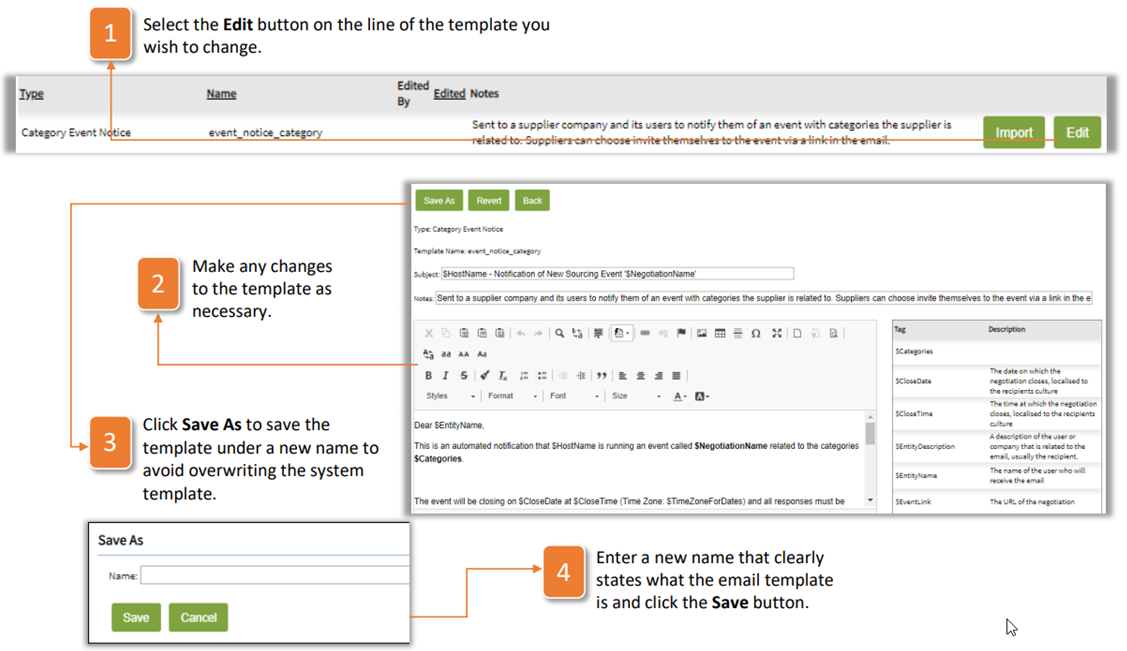
- Select the Edit button on the line of the template you wish to change.
- Make any changes to the template as necessary.
- Click Save As to save the template under a new name to avoid overwriting the system template.
- Enter a new name that clearly states what the email template is and click the Save button.
Was this article helpful?
That’s Great!
Thank you for your feedback
Sorry! We couldn't be helpful
Thank you for your feedback
Feedback sent
We appreciate your effort and will try to fix the article