Contract matrices allow you to add contract data tables. For example, you can create a price-per-item matrix for different quantities where the price per item decreases as other products are ordered at once. To create a contract matrix, follow the steps below :
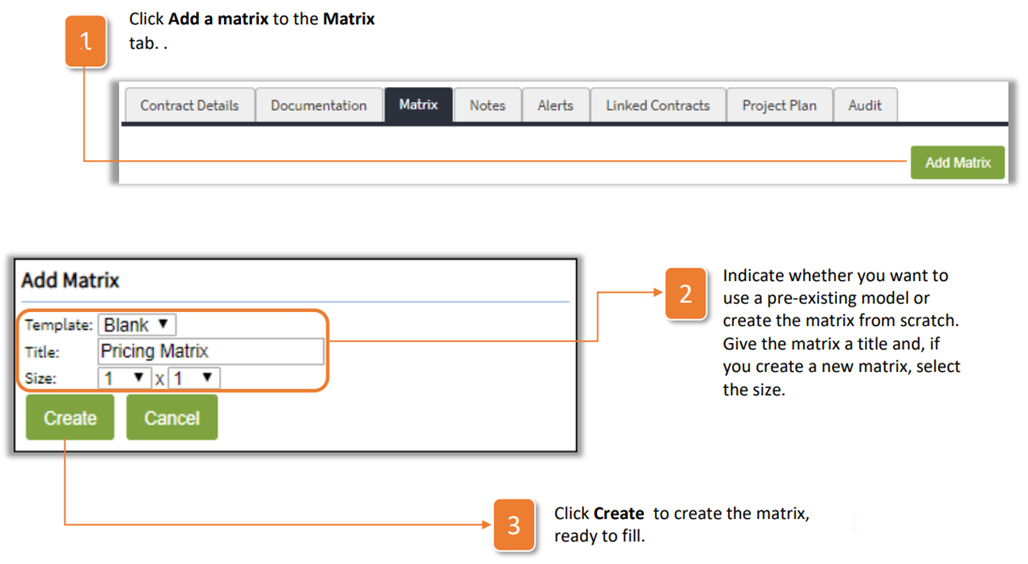
- Click Add a matrix to the Matrix tab.
- Indicate whether you want to use a pre-existing model or create the matrix from scratch. Give the matrix a title and, if you create a new matrix, select the size.
- Click Create to create the matrix, ready to fill.
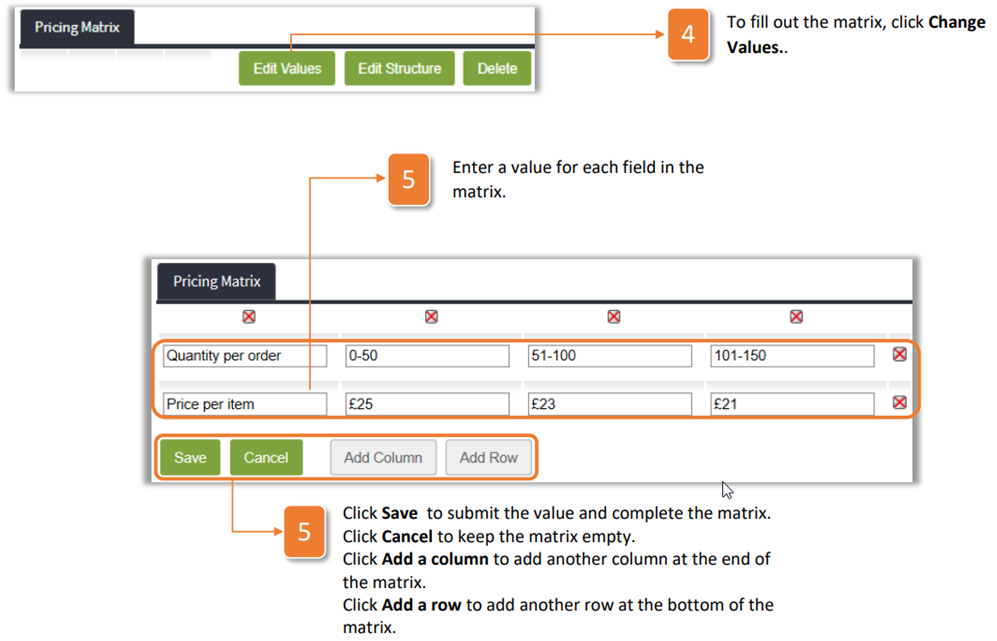
- To fill out the matrix, click Change Values.
- Enter a value for each field in the matrix. Click Save to submit the value and complete the matrix. Click Cancel to keep the matrix empty. Click Add a column to add another column at the end of the matrix. Click Add a row to add another row at the bottom of the matrix.
Was this article helpful?
That’s Great!
Thank you for your feedback
Sorry! We couldn't be helpful
Thank you for your feedback
Feedback sent
We appreciate your effort and will try to fix the article