The Attribute Editor allows you to create and assign attribute data fields for alerts. It allows you to set up specific alerts based on the responses that your suppliers give to a specific question. For example, if you ask a supplier to provide a date as a response to a question, you can set up a reminder to go out on or around that date. To add an attribute, follow the instructions below:
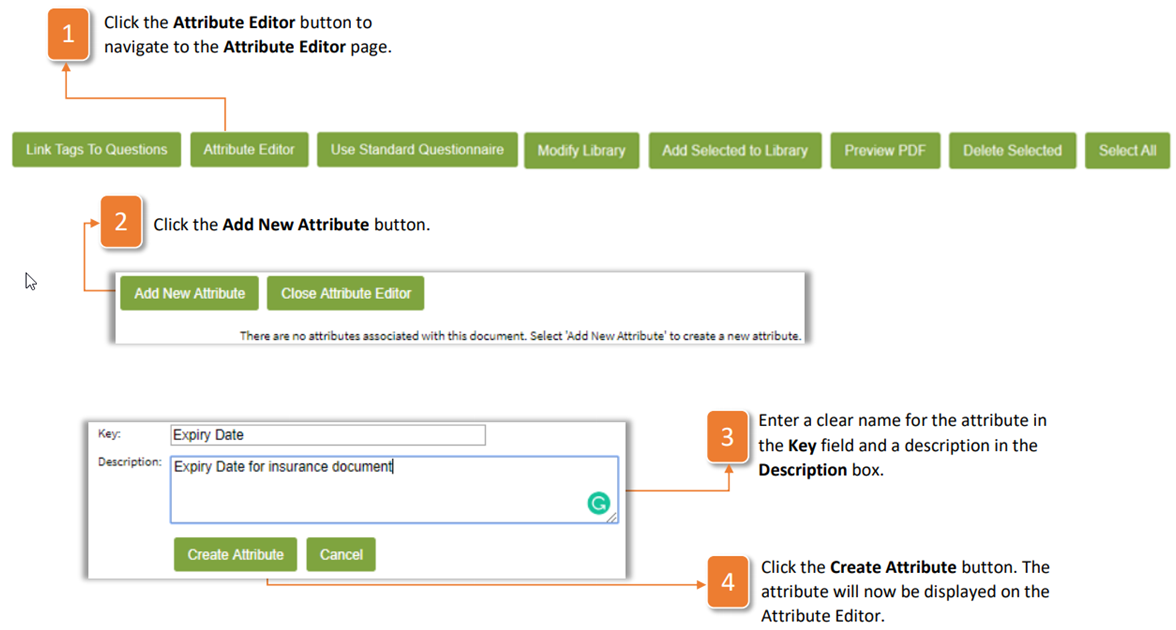
- Click the Attribute Editor button to navigate to the Attribute Editor page.
- Click the Add New Attribute button.
- Enter a clear name for the attribute in the Key field and a description in the Description box.
- Click the Create Attribute button. The attribute will now be displayed on the Attribute Editor.
Was this article helpful?
That’s Great!
Thank you for your feedback
Sorry! We couldn't be helpful
Thank you for your feedback
Feedback sent
We appreciate your effort and will try to fix the article