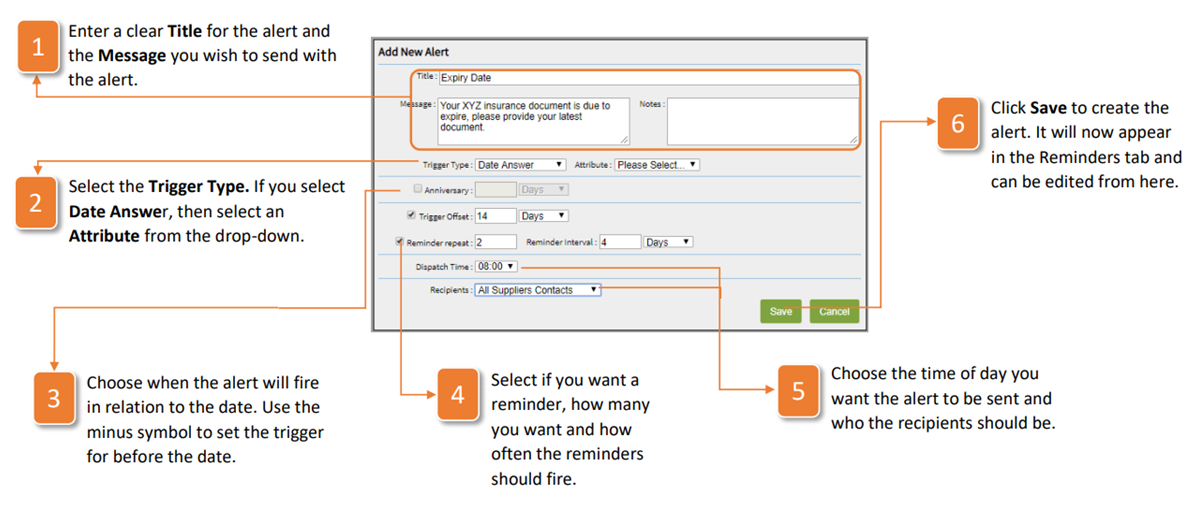
- Enter a clear Title for the alert and the Message you wish to send with the alert.
- Select the Trigger Type. If you select Date Answer, then select an Attribute from the drop-down.
- Choose when the alert will fire in relation to the date. Use the minus symbol to set the trigger for before the date.
- Select if you want a reminder, how many you want and how often the reminders should fire.
- Choose the time of day you want the alert to be sent and who the recipients should be.
- Click Save to create the alert. It will now appear in the Reminders tab and can be edited from here.
Was this article helpful?
That’s Great!
Thank you for your feedback
Sorry! We couldn't be helpful
Thank you for your feedback
Feedback sent
We appreciate your effort and will try to fix the article