If a contract has gone through the approval stage and been approved, it will display the Approved status. A contract with the Approved status will have the following Contract Actions available:
- Click the Edit button to edit any of the field within the contract details tab.
- Click the Suspend button to make the contract temporarily unavailable for use.
- Click the Terminate button to end the contract before its expiry date. This will retain the details in the system, but the status will be terminated.
- Click the Delete to delete the contract entirely.
- Click the Copy button to use the current contract as a template to prepopulate the new contract record.
Note: You will not be able to delete the contract once it is live. 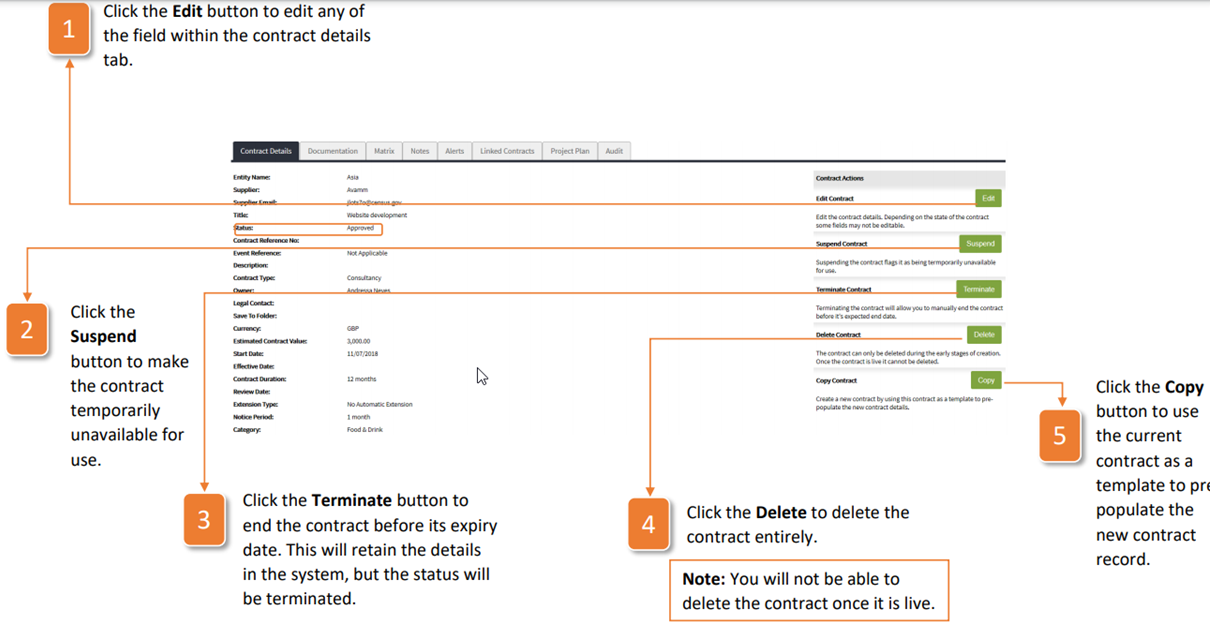
Was this article helpful?
That’s Great!
Thank you for your feedback
Sorry! We couldn't be helpful
Thank you for your feedback
Feedback sent
We appreciate your effort and will try to fix the article