You can configure the Invoices gadget to only show invoices with a specific status. Check the settings of the gadget to see if it is configured to filter out the specific invoice.
Click the cog wheel in the top right corner of the Invoices gadget.

Note the settings under Filter on invoice status.
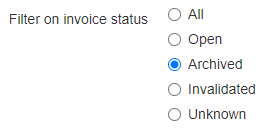
Change the status to a relevant one by clicking one of the options.
Click Save settings.
For more information on how to search for invoices, see How to search for an invoice?
Was this article helpful?
That’s Great!
Thank you for your feedback
Sorry! We couldn't be helpful
Thank you for your feedback
Feedback sent
We appreciate your effort and will try to fix the article